Wed Jan 07 2026
Homelab: The Overview
In this post, I'm going over my current home lab and the journey that got me here.
From what started off as a practical and minimal home lab with a few services and basic networking security, has now become my testing ground for security tools, experiments and self-hosted services.
It’s overkill for a home network, or at least for my level of expertise, but that’s exactly the point.
What’s a Home lab?
If we ask our friendly neighbourhood insert preferred AI chat bot what a home lab is, it may define it along the lines of:
Homelab - a personal, at-home IT environment for experimenting with hardware and software, learning new tech skills (like networking, virtualization, Linux), self-hosting services (Plex, Home Assistant, game servers), or testing IT solutions in a safe space without affecting important systems.
While it may be wise for some to keep their home labs super lean and simple, mine isn’t quite that.
Why over-engineer a Home lab?
I tend to think in polar opposites when it comes to risk, trying new things and chasing that new shiny toy depending on the context.
Generally speaking, I enjoy exploring new ideas, creating projects, trying out new things in life. But when it comes to systems in production, or in professional contexts, I’m actually pretty damn reserved, and struggle to “push the red button”, all while dealing with imposter syndrome.
This is where my home network becomes valuable - it’s a space where I don’t have to optimise for perfection or overthink the consequences of trying out new ideas.
I can create, break, and rebuild things without worrying about the “what ifs,” focusing instead on “how would I execute this?” or “I want to learn that.”
Concepts that seem trivial to senior network engineers, i.e, trunk ports, native VLANs, tagging, inter-VLAN routing, start to make a whole lot of sense when you’ve screwed up trying to be “clever” after misconfiguring them a few times and finally understand why they work the way they do.
My take is: If you’re willing to break things and rebuild them consciously, it’s an incredible learning opportunity.
The Setup
Below is an overview of my bare metal machines, services, and VLAN setup.
Network Devices + Routing
- UniFi Dream Machine Pro
- 2x UniFi APs
- UniFi Switches with routing throughout the house
Servers
-
Main Proxmox - Main Production Server featuring most applications and services
-
Network Proxmox - Small Dell Wyse Machine with networking services like AdGuard and Nginx Proxy Manager. I wanted to split these services off on their own machine as I didn’t want to bring down my DNS server for example if I ever needed to reboot my main Proxmox server.
-
Synology DS923+ - Main NAS Server
-
Unraid Server - Additional NAS Server
VLANs (oh boy!)
I currently have 9 VLANs. Yes. 9. 🤯 That is surely overkill, right? Right!
I’m sure we can all talk about the maximum amount of VLANs a home network should have, if any at all, however, constantly expanding and testing (very carefully) has been an immense amount of knowledge gained.
Not all of these VLANs existed from day one.
I started with four: Default, Main, IoT, and Guest. The others evolved as my needs did.
- Default - The default network in a UniFi ecosystem. This houses my Unifi UDM Pro, switches, and other networking
- Main - Trusted devices. Personal computers, phones, tablets—anything that’s either hardened, open source, or used frequently enough to stay updated.
- IoT - Smart home devices that don’t need direct internet access. Home Assistant handles their connectivity needs.
- Guest - For visitors. Isolated from everything else.
From here I added two additional VLANs:
- Security - IP cameras and related security hardware. When I installed cameras, isolating them felt like an obvious move based on common sense and what I’d seen in other setups.
- Media came into fruition once I started using more devices with propriety or harder to manage OS’s or software, that can sometimes go for months without updates. I didn’t want them in my Main VLAN, but they aren’t an “IoT” device either, so Media essentially became like an “Untrusted” VLAN.
At this point, I’ve stopped asking “how many VLANs should I have?” and started asking “what do I need, what are my goals, and how do I get there?” The segmentation helps me mentally organise everything, and that’s worth the added complexity.
- Servers - Bare metal machines and self-hosted services. This one emerged naturally as I deployed more infrastructure.
- SOC - Security Operations Center. All observability, monitoring, SIEM tools, and security-focused services live here.
- Sandbox - Isolated testing environment for anything experimental or potentially dangerous. CTF practice, vulnerable VMs, attack simulations.
Services
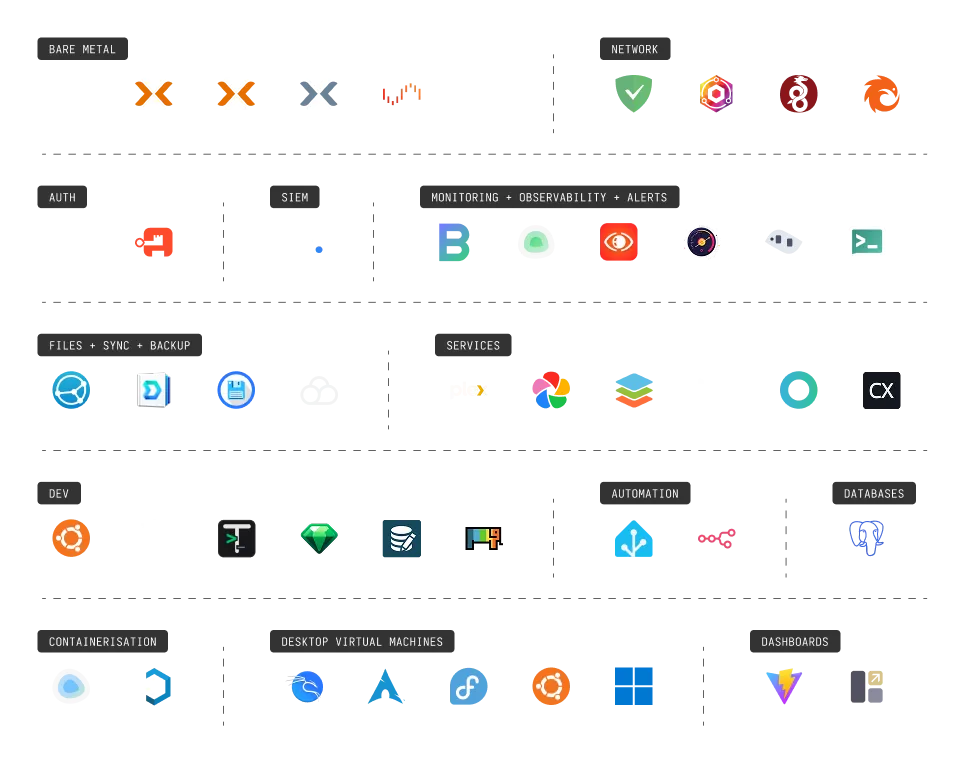
Network Services
- AdGuard Home - My DNS server with ad filtering. Only runs on specific VLANs where it makes sense.
- Nginx Proxy Manager - Local reverse proxy for clean domain names and SSLs.
- WireGuard - VPN for remote access to the home network. Currently using the UniFi integration, though I’m evaluating Netbird.
- Pangolin - Testing this out for creating tunnels and shareable links to internal services. So far, it’s been solid.
Authentication
- Vaultwarden - My self-hosted password manager for local services. Works perfectly with the Bitwarden browser extension.
- Authentik - Identity provider for adding proper login pages and SSO to internal apps.
Security Operations (SOC)
- Wazuh - My first main SIEM. Deploying agents across the network and learning about alerts, vulnerability detection, and tuning out false positives has been invaluable. This is just the beginning—more tools coming soon.
Monitoring and Observability
I’m running a stack of tools to keep tabs on everything. Some services are purely running for testing at this stage while I’m weighing up what I prefer. There is of course some overlap at the moment.:
- Beszel - Resource monitoring
- Uptime Kuma - Service availability tracking
- SigNoz - Application performance monitoring
- Netronome - Network flow analysis (still testing)
- Dockpeek - Container inspection
- Ntfy - Push notifications for alerts
Development Environment
I maintain a remote development server for when I need to work away from my main machine:
- Ubuntu Server - Remote Dev Server
- Dockge - Container management for dev tools
- DBGate - Database management
- Termix - Terminal access
- Yaade - API testing
- DrawDB - Database schema design
- ChartDB - Database visualisation
Automation
- Home Assistant - Managing my IoT devices and smart home automation.
- n8n - Testing out workflow automation. Just started exploring this for integrating various services.
Databases
- PostgreSQL - The database I’m currently using for my local applications and hosted services that utilise Postgres.
Containerisatiom
- Dockge - Docker container management. Cleaner interface than Portainer for my use case.
- Kasm - Isolated browser environments and application streaming.
Virtual Desktops
I’m running several OS VMs on Proxmox for different purposes:
- Kali Linux - Primary environment for penetration testing and CTF challenges.
- Arch Linux, Fedora, Ubuntu - Testing different distributions as I plan to switch from to Linux as my daily driver in the near future.
- Windows 11 - This one has a story. A laptop had catastrophic motherboard issues, and rather than lose everything, I used
Clonezillato create a full system image. Now it lives as a VM, fully functional.
Whats next?
I’m continuing to expand the SOC capabilities. I’ll also be adding a few vulnerable VMs to the Sandbox for practice, and refine the monitoring stack.
I’ll also put together more of a deeper-dive that will cover:
- Detailed hardware specifications and why I chose each component
- My network topology (nearly done!)
- Lessons learned and mistakes made along the way
Stay tuned!